PDF to Excel
Extract tables, financial statements, and structured data from any PDF into a clean, formula-ready Excel workbook — no manual copy-pasting required.

Trusted by 1,000+ finance professionals across PE, VC, growth equity, real estate, and hedge funds.
Built for finance teams doing high-stakes work
Private Equity
Pull operating metrics, add-backs, and KPI tables from CIMs and diligence files into Excel models.
Hedge Funds
Extract data from filings, investor presentations, and earnings materials for faster research workflows.
Real Estate
Convert rent rolls, offering memorandums, and lender packages into clean, analyzable spreadsheets.
Investment Banking
Standardize financial statement tables from PDFs into workbook-ready tabs for comps and modeling.
How It Works
Upload your PDF
Drag and drop any PDF — financial statements, reports, or data tables — into your Compound workspace.
Ask for what you need
Tell the AI Analyst exactly what data to extract: specific tables, ranges, or entire documents. It understands financial context.
Get a clean spreadsheet
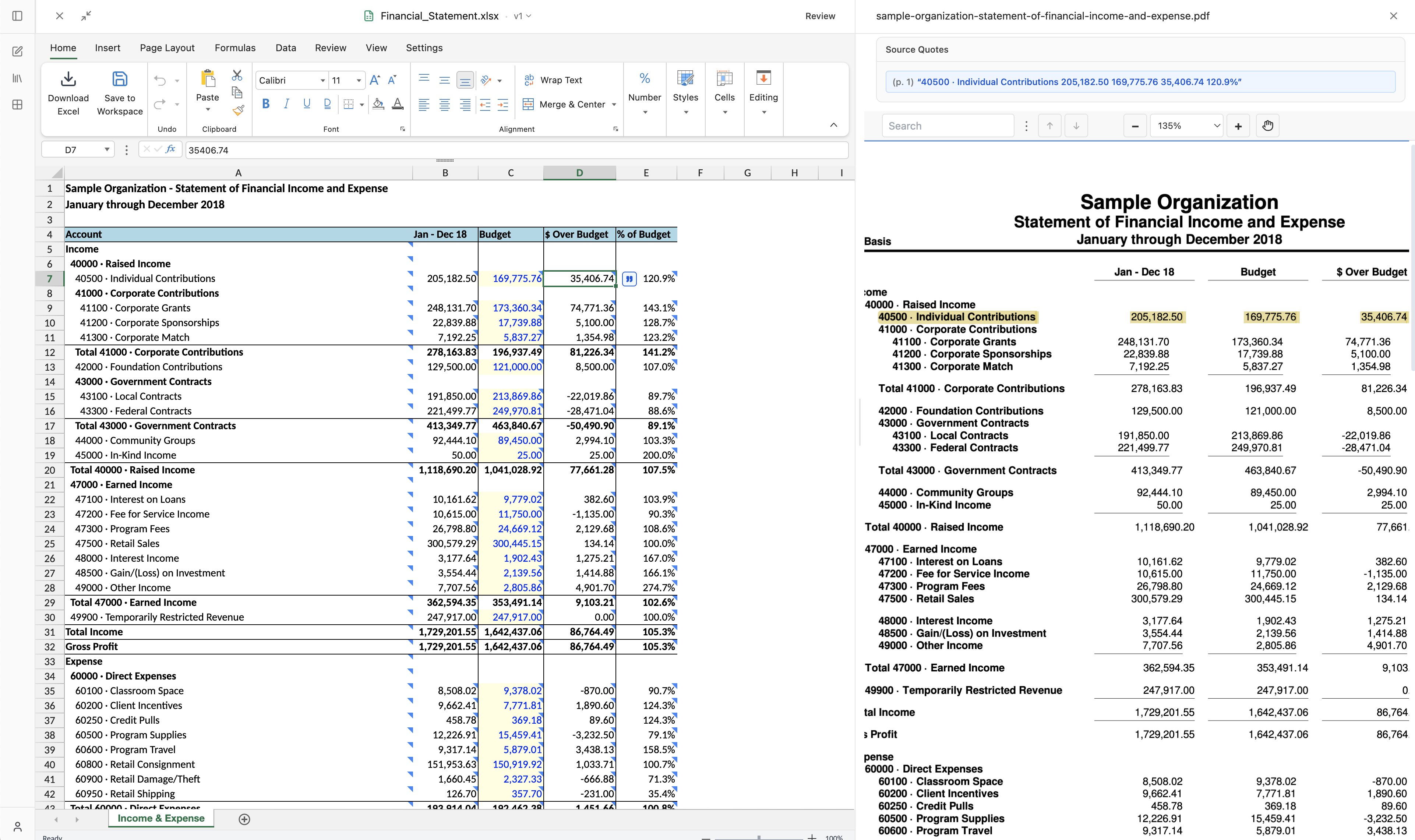
Receive a structured Excel workbook with proper formatting and cited sources — every extracted value traces back to the original PDF page.
Why Compound Excels
Financial-grade accuracy
Purpose-built for financial documents. Compound understands P&L layouts, balance sheets, and multi-year tables that generic tools mangle.
Cited sources, not black boxes
Every extracted value cites the exact page and location in the source PDF, so you can verify any number with a single click.
Batch processing
Upload dozens of PDFs to a single workspace and extract data across all of them in one conversation — no file-by-file tedium.
For finance workflows, the difference is not just speed. It's reliability and auditability.
Manual copy/paste
- Table structure retention
Fragile and time-consuming
- Financial context understanding
Depends on analyst effort
- Citation traceability
Manual note-taking required
- Batch processing
One file at a time
- Output quality in Excel
Inconsistent formatting
Generic OCR tools
- Table structure retention
Often breaks on complex tables
- Financial context understanding
Limited context awareness
- Citation traceability
Usually unavailable
- Batch processing
Limited multi-file workflows
- Output quality in Excel
Requires heavy cleanup
Compound
- Table structure retention
Reliable on financial table layouts
- Financial context understanding
Built for financial documents
- Citation traceability
Span-level citations by default
- Batch processing
Analyze dozens of PDFs in one workspace
- Output quality in Excel
Clean, formula-ready workbooks
Upload a sample PDF and see the output in minutes
Frequently Asked Questions
Compound handles scanned documents, native PDFs, financial filings (10-Ks, 10-Qs), pitch decks, data room files, and more. It uses multi-modal processing for industry-leading accuracy on complex table layouts.
Yes. Compound generates Excel files with proper cell formatting, number types, and formulas. You get a workbook you can immediately audit and extend, not a flat paste of values.
You can upload hundreds of files to a single workspace. Compound's infinite-context architecture lets the AI search across all of them to find and extract the data you need.
Compound is SOC 2 Type II certified with AES-256 encryption at rest and in transit. Your documents are never used for model training, and VPC deployments are available for maximum security.